
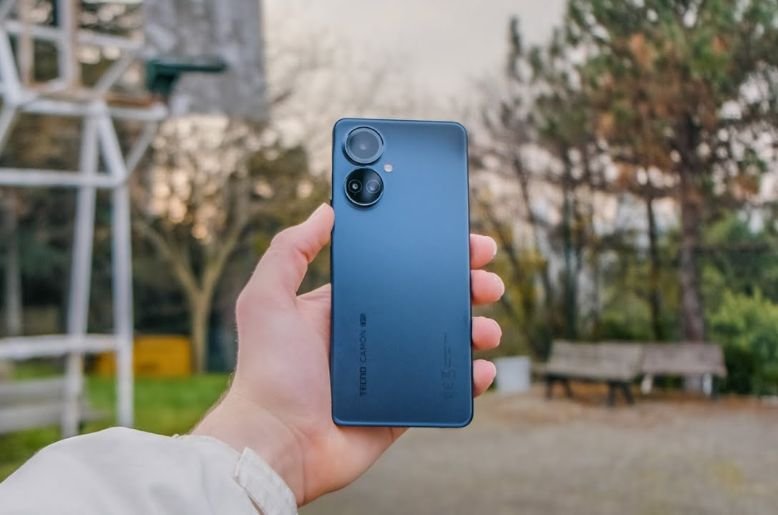
The Tecno Camon 19 Pro has arrived, and it brings more than just a beautiful screen and a powerful camera. While many reviews talk about its main specs, this phone has secret features that make using it a special experience. We dug deep into the settings and software to find the tools and tricks that are not always advertised. These hidden gems can change how you use your phone every day.
This guide will show you 10 secret features of the Camon 19 Pro. We will go beyond the basic information. You will learn about clever camera modes, smart privacy tools, and ways to make your phone truly yours. Get ready to unlock the full power of your device. These features show that the Camon 19 Pro is more than just a phone; it’s a smart companion designed to make your life easier and more fun. Let’s explore these amazing hidden functions together.
1. Master night photography with Super Night 3.0
Everyone knows the Camon 19 Pro has a great camera. But its real magic appears when the sun goes down. Hidden within the camera app is the Super Night 3.0 algorithm. This is not just a simple night mode. It uses advanced AI to combine multiple photos into one bright, clear image.
What makes it special is the RGBW sensor technology. The ‘W’ stands for white, and this extra sensor captures more light than traditional phone cameras. When you use Super Night 3.0, the phone’s processor works with this sensor to reduce noise and reveal details you cannot see with your own eyes. Your night photos of city streets or evening gatherings will look professional. You do not need a heavy DSLR camera to capture stunning low-light shots. The Camon 19 Pro does all the hard work for you.
2. Create professional videos with film mode
Beyond taking photos, the Camon 19 Pro is a mini movie studio. Tucked away in the camera’s “More” section is the Film Mode. This mode is a fantastic tool for anyone who loves making videos. It changes the screen to a wide cinematic view and gives you access to professional video templates.
You can choose from different styles like “Performance,” “Party,” or “Sport.” Each template adds movie-like color grading, smooth transitions, and background music to your clips. It guides you on how to shoot short scenes and then automatically edits them into a polished video. This feature makes it easy to create impressive short films or social media stories without needing any video editing skills. The Camon 19 Pro empowers you to be a director.
3. Protect your privacy with peek-proof
In a crowded place, it is hard to keep your screen private. The Camon 19 Pro has a clever solution called Peek Proof. You can find this feature in your quick settings panel. When you turn it on, it creates a digital curtain on your screen.
Only a small part of the screen stays visible, while the rest is darkened. You can move this visible window around with your finger and even change its size. This means you can read a private message or check your bank account without worrying about people next to you seeing your screen. It is a simple but powerful privacy tool that gives you peace of mind in public spaces. This feature shows that your security is a top priority.
4. Multitask like a pro with the smart panel
The Camon 19 Pro helps you do many things at once with its Smart Panel. This is a customizable sidebar that you can access by swiping from the edge of the screen. It is more than just a shortcut menu. It allows for true multitasking.
From the Smart Panel, you can quickly launch your favorite apps. More importantly, you can open some apps in a floating window. This means you can reply to a WhatsApp message while watching a YouTube video, without switching between apps. You can also take screenshots, record your screen, and access other useful tools directly from this panel. It makes the large 6.8-inch display even more useful, turning your phone into a powerful productivity machine.
5. Clone your favorite apps with App Twin
Do you have two WhatsApp or Facebook accounts? One for work and one for personal life? Managing them on one phone can be difficult. The Camon 19 Pro solves this with a feature called App Twin.
Located in the settings under “Special function,” App Twin lets you create a second copy of an application. This means you can have two separate versions of WhatsApp, Instagram, or Facebook running on your phone at the same time. Each app will have its own account and notifications. This eliminates the need to constantly log in and out. It is a perfect solution for people who need to manage their personal and professional lives on a single device.
For Apple enthusiasts, don’t miss our list of all iPhones under Rs50,000 in Pakistan.
6. Personalize everything with a DIY theme
Your phone should reflect your personality. The Camon 19 Pro offers a powerful customization tool called DIY Theme. This feature is found inside the Hi Theme app on your phone. It lets you become a designer and create your own unique theme from scratch.
You can choose your own wallpaper, select custom icons for your apps, and even change the font style across the phone. The process is simple and fun. It allows you to mix and match different elements until you create a look that is perfect for you. This goes beyond just changing the wallpaper; it gives you full control over the look and feel of your phone’s software.
7. Enhance your gaming with Game Space 4.0
The Camon 19 Pro is a great device for gamers, and its dedicated Game Space 4.0 makes the experience even better. This is not just a folder for your games. It is a complete gaming hub that optimizes your phone’s performance.
When you launch a game through Game Space, it automatically boosts the processor, clears memory, and blocks notifications so you can play without interruptions. A special gaming panel, called the Magic Button, can be assigned to on-screen controls, giving you a console-like feel. It also includes a voice changer, which is a fun tool to use when playing with friends online. Game Space ensures that every gaming session on your Camon 19 Pro is smooth and immersive.
8. See everything clearly with the 120 Hz display
Many phones have high refresh rate screens, but the Camon 19 Pro makes this feature smarter. The phone has a 120 Hz refresh rate, which makes scrolling and animations feel incredibly smooth. The hidden part is its adaptive refresh rate technology.
In the display settings, you can choose “Auto-switch Refresh Rate.” When this is active, the phone intelligently adjusts the screen’s speed based on what you are doing. It will use the full when you are scrolling or playing a game, providing a fluid experience. When you are looking at a static photo or reading text, it will lower the rate to save battery life. This smart system gives you the best of both worlds: silky smooth visuals when you need them and better battery efficiency when you do not.
9. Focus on your health with a health kit
Your smartphone can also be a partner in your well-being. The Camon 19 Pro includes a built-in Health Kit application. This app uses the phone’s sensors to track your daily activities. It can count your steps, measure the distance you have walked, and estimate the calories you have burned.
You can set daily goals to stay motivated. The app also has features to track your sleep patterns and exercise routines. It presents all this information in easy-to-read charts, helping you understand your fitness journey. Having this tool built into your phone makes it easy to keep an eye on your health without needing an extra fitness band.
10. Translate conversations in real time with an AI voice assistant
The AI Voice Assistant on the Camon 19 Pro has a powerful hidden talent: real-time translation. This feature is a game-changer for travelers or anyone communicating with people who speak different languages.
When you activate the voice assistant, you can ask it to be your interpreter. You can speak a phrase in your language, and the phone will translate and speak it aloud in another language. It also works in reverse, translating what someone else says back to you. This feature supports multiple languages and can help break down communication barriers, turning your phone into a universal translator that fits in your pocket.


