Have you ever found an old SIM card in your drawer and wondered what its number was? Or perhaps you just bought a new connection and forgot to save your own contact details. This is a very common problem for mobile users in Pakistan. Remembering an 11 digit number is not always easy.
Ufone is one of the most popular mobile networks in Pakistan. It is known for its “Tum Hi Tou Ho” slogan and great customer service. If you are a Ufone user, you do not need to worry. You can find your number in just a few seconds.
This guide will show you how to check ufone sim numbers using the latest methods of 2026. These methods are fast, simple, and mostly free. You do not even need to have a balance in your account to use most of these tricks.
Why you need to know your Ufone number
Knowing your own mobile number is essential for many daily tasks in Pakistan. You need it to:
- Share your contact details with friends and family.
- Top up your balance or subscribe to internet packages.
- Register for mobile banking apps like Easypaisa or JazzCash.
- Verify your identity for government services.
Instead of calling another person just to see your number on their screen, you should use the official codes. This saves your time and your balance.
How to check Ufone sim number via USSD code
The fastest way to retrieve your details is by using a USSD code. This method works on all types of mobile phones. It does not matter if you have an expensive smartphone or a simple feature phone.
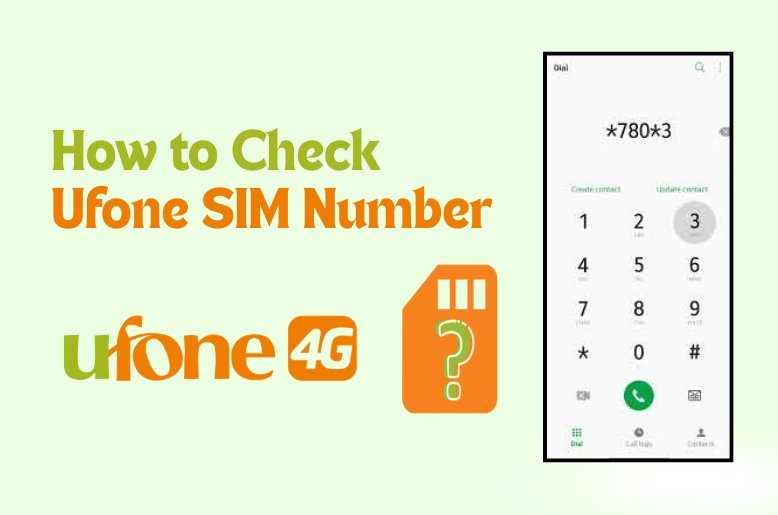
Method 1: Dialing 7803# (Recommended)
This is the primary code for all Ufone prepaid and postpaid customers in 2026. It is highly reliable and works even if you have zero balance.
Follow these simple steps:
- Open the Phone Dialer app on your mobile.
- Type the code *780*3# using the keypad.
- Press the Call button from your Ufone SIM.
- Wait for a few seconds.
- Your Ufone mobile number will appear on your screen.
Method 2: Dialing *1#
If the first code does not work due to a network error, you can try this alternative. Some older SIM cards respond better to this shorter code.
- Open your dialer.
- Dial *1#.
- Your number will flash on the display immediately.
These codes are completely free of cost. Ufone does not charge any money for showing your own number on your screen.
How to check Ufone sim number via SMS
Sometimes, the USSD codes might be busy because of high network traffic. In such cases, the SMS method is a great backup. This method is also useful if you want to see the registered owner’s name and CNIC details.
Using the 667 service
The 667 shortcode is a universal service in Pakistan. It helps you find out the registration details of any SIM card.
- Open the Messaging app on your phone.
- Create a “New Message”.
- Type MNP in the message body.
- Send this message to 667.
- You will soon receive a reply from Ufone.
This reply will contain your mobile number, the owner’s name, and their CNIC number. Please note that sending an SMS to 667 might cost a small amount of balance according to your current tariff. Use this method if you need more than just the phone number.
It is also vital to keep your registration data updated. Read everything you need to know about SIM database online in 2026 to stay informed about your active connections.
Check your number using the My Ufone App
If you have a smartphone and an active internet connection, the My Ufone App is your best friend. It provides a complete dashboard for your SIM card.
- Download the My Ufone App from the Google Play Store or Apple App Store.
- Open the app.
- If you are already logged in, your mobile number will be visible at the very top of the home screen.
- You can also see your remaining balance, active packages, and expiry date.
The app is the most modern way to manage your Ufone account. It gives you a clear visual look at everything related to your SIM.
Analysis: Which method should you choose?
Based on my analysis, the USSD code 7803# is the winner for most users. Why? Because it is instant and free. In Pakistan, many users keep their SIMs on low balance. A method that requires money or an internet connection is not always practical.
However, if you are a professional or a business person, using the My Ufone App is better. It allows you to keep track of your usage and ensures you never run out of data or minutes unexpectedly.
What to do if none of the methods work?
If you are still unable to find your number, there might be a technical issue with your SIM card. Here is what you should do:
- Check SIM Placement: Ensure your SIM is properly inserted in the slot.
- Restart Your Phone: Sometimes a simple restart fixes network signal issues.
- Call the Helpline: Dial 333 from your Ufone SIM. A customer representative will help you. You may need to provide your CNIC details for verification.
- Visit a Franchise: If your SIM is very old or damaged, visit the nearest Ufone Service Center. Bring your original CNIC with you.
Safety tips for sim users in Pakistan
It is important to keep your SIM details safe. Never share your CNIC or personal codes with strangers. The PTA (Pakistan Telecommunication Authority) recommends that you only use SIM cards registered in your own name. You can check how many SIMs are on your CNIC by sending your CNIC number to 668.
Keep your SIM active! PTA warns of SIM blocking linked to expired CNICs, update yours now.
Final thoughts
Finding your forgotten mobile number is no longer a headache. Whether you use the quick code *780*3# or send an SMS to 667, Ufone makes it very easy for its users. We recommend saving your number in your phone contacts as “My Number” once you find it. This will save you from searching for these codes again in the future.
Stay connected and enjoy the seamless services provided by Ufone across Pakistan.
FAQs
Q. Is there any charge for dialing 7803#?
No, this USSD code is absolutely free. You can use it even with zero balance.
Q. Can I check my Ufone number if my SIM is blocked?
Usually, these codes do not work on blocked SIMs. You must visit a Ufone franchise to unblock it first.
Q. Does the 1# code work for all Ufone users?
Yes, it works for most prepaid and postpaid customers, but *780*3# is more reliable in 2026.
Q. How can I find the owner’s name of my Ufone SIM?
Send an SMS with the text “MNP” to 667. You will receive the owner’s name and CNIC details.
Q. Can I check my number without putting the SIM in a phone?
No, you must insert the SIM into a mobile phone to dial the codes or send an SMS.