
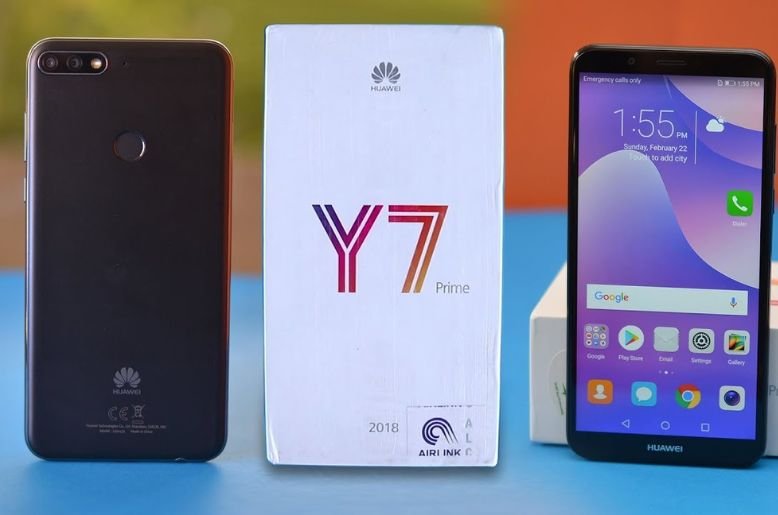
The Huawei Y7 is a popular choice for many smartphone users in Pakistan. It offers a big screen and a stylish design at an affordable price. People love its large battery and solid build quality. However, like any electronic device, it is not perfect. Users sometimes face issues that can be frustrating. These problems range from battery drain to slow performance.
You might feel annoyed if your phone stops working correctly. But don’t worry. Most of these issues have simple solutions. You do not always need to visit a repair shop. This guide will help you fix common problems on your Huawei Y7 yourself. We will look at why these issues happen. Then, we will provide easy steps to solve them. Let’s make your phone run like new again.
Why Is My Huawei Y7 Acting Up?
Before we fix the problems, we need to understand them. Several factors can cause your phone to slow down or misbehave. Sometimes, the issue is with the software. Other times, it might be how we use the phone.
The Huawei Y7 runs on Android with Huawei’s own EMUI skin. This software is feature-rich but can be heavy. Over time, junk files build up. Apps might crash or use too much memory. In Pakistan, high temperatures can also affect battery life and performance. Dust and humidity are other factors that can impact the hardware. Understanding these basics helps us troubleshoot better.
Common Problem 1: Rapid Battery Drain
One of the most common complaints about the Huawei Y7 is battery life. You might notice the percentage dropping quickly, even when you are not using the phone much.
Why It Happens
Battery drain often happens because of background apps. These apps keep running even when you close them. They search for updates or location data constantly. High screen brightness also eats up power. Sometimes, an old or corrupt battery is the culprit, especially if the phone is a few years old.
How to Fix It
- Check Battery Usage: Go to Settings > Battery > Battery usage. This shows you exactly which apps are using the most power. If an app uses a lot of battery but you rarely use it, uninstall it.
- Turn Off Auto-Sync: Features like auto-sync for email and social media constantly use data and battery. Turn this off in your account settings and sync manually when needed.
- Adjust Screen Brightness: Lower your screen brightness. You can also turn on “Auto-brightness” so the phone adjusts it based on the light around you.
- Use Power Saving Mode: Huawei provides excellent power-saving tools. Go to Settings > Battery and turn on “Power Saving Mode” or “Ultra Power Saving Mode” when you need to extend life quickly.
After reading about Smart Hanhan’s impressive AI features, check out our Huawei Y7 Problems & Fixes guide to keep your device running smoothly.
Common Problem 2: Phone Lagging and Freezing
Does your Huawei Y7 feel slow? Does it pause when you open an app or type a message? This is called lag. It makes using the phone very difficult.
Why It Happens
The Huawei Y7 is a budget-friendly phone. It does not have the most powerful processor. If you fill the internal storage with photos, videos, and apps, the system struggles. Having too many apps open at once also uses up the RAM (Random Access Memory). This leaves no room for the phone to think.
How to Fix It
- Clear Cache Partition: This is a very effective fix. Turn off your phone. Press and hold the Volume Up and Power buttons together until the Huawei logo appears. Use volume buttons to select “Wipe cache partition” and press the Power button to confirm. This clears temporary junk files without deleting your personal data.
- Free Up Storage: Go to Settings > Storage > Storage cleaner. Delete junk files, old WhatsApp images, and unused apps. Aim to keep at least 20% of your storage free.
- Limit Background Processes: You can tell the phone to stop running so many things at once. Enable Developer Options (tap Build Number 7 times in About Phone). Then find “Background process limit” and set it to “At most 3 processes.”
- Update Software: Ensure your EMUI version is up to date. Updates often include fixes that smooth out performance.
Common Problem 3: Wi-Fi and Bluetooth Connection Issues
In Pakistan, stable internet is crucial. It is very frustrating when your Huawei Y7 refuses to connect to Wi-Fi or drops the connection. Bluetooth problems can also prevent you from using wireless headphones or sharing files.
Why It Happens
These issues are usually software glitches. Sometimes the phone gets confused by old connection settings. Interferences from other devices can also disrupt the signal.
How to Fix It
- Reset Network Settings: This is the best solution. Go to Settings > System > Reset > Reset network settings. This will wipe all saved Wi-Fi passwords and Bluetooth pairings. You will have to enter them again, but it clears out the bugs.
- Toggle Airplane Mode: Swipe down from the top of the screen. Tap the Airplane mode icon to turn it on. Wait for 30 seconds. Turn it off again. This forces the phone to restart all its wireless radios.
- Forget the Network: Go to Wi-Fi settings, long-press your network name, and select “Forget network.” Then reconnect by entering the password again.
Common Problem 4: Overheating While Charging or Gaming
Heat is the enemy of smartphones. If your Huawei Y7 gets too hot, it can damage internal parts.
Why It Happens
Gaming requires a lot of processing power. The processor works hard and generates heat. Charging also creates heat naturally. If you do both at the same time, the phone will get very hot. Using a thick case can trap this heat inside.
How to Fix It
- Remove the Case: If you are charging the phone or playing a heavy game like PUBG, take the cover off. This lets the heat escape.
- Stop Using While Charging: Let the phone rest while it is plugged in. Using it slows down charging and increases temperature.
- Close Unused Apps: Before you start a game, close all other apps. This reduces the load on the processor.
Common Problem 5: Google Play Services Issues
Some users face errors with the Google Play Store. You might see messages like “Google Play Services has stopped,” or apps refuse to update.
Why It Happens
Cached data in the Play Store app can get corrupted. Sometimes, an incomplete update causes these errors.
How to Fix It
- Clear Data for Play Store: Go to Settings > Apps > Apps > Google Play Store > Storage. Tap “Clear Cache” and “Clear Data.” Do the same for “Google Play Services.”
- Check Date and Time: Ensure your date and time settings are correct. An incorrect time can prevent Google servers from syncing with your phone. Set it to “Automatic date & time.”
Common Problem 6: Camera App Crashing or Blurry Photos
The Huawei Y7 has a decent camera for its price. But sometimes the app crashes, or pictures look blurry even when the lens is clean.
Why It Happens
Software bugs can cause the app to crash. Blurry photos might be due to the camera struggling to focus in low light or a smudge on the lens that is hard to see.
How to Fix It
- Clear Camera Cache: Go to Settings > Apps > Apps > Camera > Storage. Clear the cache and data. This resets camera settings to default, but won’t delete your photos.
- Force Stop the App: If the camera freezes, go to App settings and select “Force Stop” on the Camera app. Then open it again.
- Use Third-Party Apps: If the main camera app keeps failing, try downloading a different camera app like “Open Camera” from the Play Store to see if it works better.
When to Seek Professional Help
Sometimes, DIY fixes are not enough. If you have tried all these steps and the problem persists, it might be a hardware issue.
- Physical Damage: If you dropped your phone and the screen is cracked or the body is bent, internal parts might be broken.
- Water Damage: If your phone fell in water, turn it off immediately. Do not charge it. Take it to a professional.
- Dead Battery: If the battery drains in just one hour or the phone turns off randomly, you probably need a new battery.
The Huawei Y7 is a sturdy device that can last a long time with proper care. By keeping the storage clean and managing your apps, you can avoid most of these headaches. Regular maintenance goes a long way.


