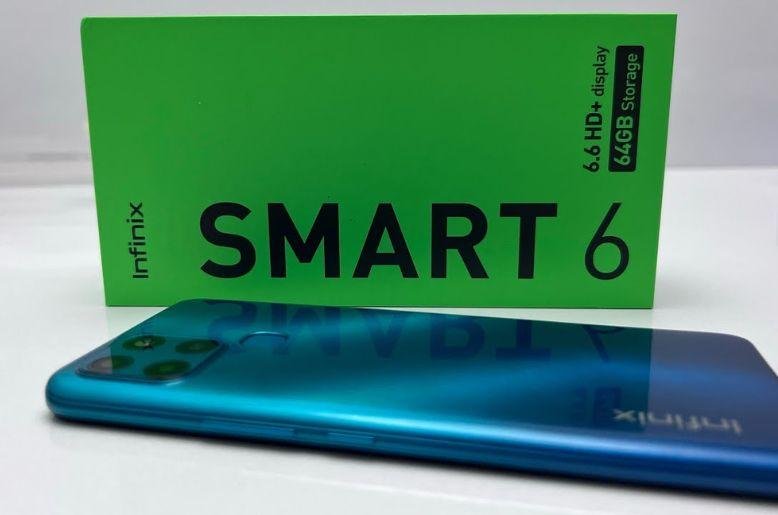
Many people buy a new phone and only use the basic applications. You might make calls, send text messages, and watch videos. However, your smartphone can do much more than that. The Infinix Smart 6 packs many secret tools inside its software. These tools can save your battery, protect your privacy, and make your daily life easier. This guide reveals the absolute best tips for your device. You will learn how to unlock the full potential of your phone today.
Most users never open the advanced settings menu. They miss out on great functions that come built right into the device. You do not need to download extra applications to use these features. The company includes them for free to improve your experience. Let us dive into the best tricks you can start using right now.
Make your battery last much longer
Battery life is extremely important for mobile users in Pakistan. The Infinix Smart 6 comes with a massive 5,000 milliampere battery. This big battery already gives you a long usage time. You can easily use your phone for a full day. But you can push the battery life even further with some simple tweaks.
Use the power of marathon technology
The phone features a special tool called Power Marathon. This tool helps you immensely when your battery drops very low. It turns off useless background activities. It limits the phone to basic functions like calling and texting. This feature gives you extra hours of calling time even when you only have five percent battery left. You can easily activate this life-saving setting in the battery menu.
Turn on the dark theme
Bright screens consume a lot of electrical power. You can easily switch your phone to dark theme mode. This setting changes all the bright white backgrounds to deep black colors. It greatly reduces the strain on your eyes at night. It also helps your battery last much longer throughout a busy day. You can set the dark theme to turn on automatically when the sun sets.
Boost phone speed and storage
Budget phones sometimes slow down after a few months of heavy use. Your Infinix Smart 6 uses a modest processor to keep the price low. You need to manage the memory well to keep the phone fast. Luckily, the phone includes special tools to help you maintain a high speed.
Clear background apps quickly
Having too many open applications slows down your device. The phone has a smart manager that clears your system memory with one tap. You should use this feature daily. It closes applications you are not using anymore. This frees up the processing power for the game or video you want to enjoy right now. Your phone will feel brand new and fast again.
Use the app freezer function
Some applications drain your battery and slow down your phone even when you do not open them. The App Freezer is a brilliant hidden feature. You can put rarely used applications into this digital freezer. The phone completely stops them from running in the background. They will not send you notifications or use your internet data. When you need the application again, you simply take it out of the freezer.
If you love discovering hidden features in budget smartphones, you should also read our detailed article on Top Features of Hot 11s You Need to Know Before Buying. It is another amazing budget phone packed with impressive features that might surprise you.
Upgrade your security and privacy
Keeping your personal information safe is vital. You store photos, messages, and bank details on your mobile device. The Infinix Smart 6 offers excellent security features. You can protect your data from annoying friends or strangers.
Lock apps with your fingerprint
You do not need to download a third-party application to lock your software. Your phone has a native application lock feature. You can select specific applications like WhatsApp or your photo gallery. The phone will ask for your fingerprint every time someone tries to open it. This keeps your personal conversations perfectly safe and completely private.
Hide your secret files
Sometimes you have private photos or documents that you want to keep hidden. The Xhide feature creates a secret vault inside your phone. You can move your sensitive photos, videos, and sound recordings into this hidden space. Nobody can see these files in your regular gallery. You must enter a special password to access the hidden vault.
Improve your photography skills
The camera on this phone performs very well for its price category. You can take beautiful photos of your family and friends. The camera software includes several smart features that help you take better pictures without any professional training.
Use auto-scene detection
The camera has an artificial intelligence brain built inside it. When you point the camera at a flower, it knows you are looking at a plant. When you point it at food, it adjusts the colors to make the meal look delicious. You should always keep the artificial intelligence scene detection turned on. It automatically changes the camera settings to give you the perfect shot every single time.
Take better selfies with flash
Taking selfies in the dark is very difficult. Most phones only have a flash on the back. The Infinix Smart 6 has a hidden trick for night selfies. The screen turns bright white right before the camera takes the picture. This bright screen acts like a front flash. It lights up your face beautifully. You can now take amazing selfies even in very dark rooms.
Smart gestures for quick access
Navigating through menus takes too much time. You can use simple hand motions to control your device faster. The software supports many smart gestures that feel like magic.
Double-tap to wake the screen
Pressing the power button every time you want to check the time is annoying. You can enable the double-tap feature in the settings. When your phone is sleeping on the table, you just tap the screen twice with your finger. The screen immediately turns on. You can tap it twice again to put it back to sleep. This protects your physical power button from breaking.
Music control gestures
Listening to music is very popular. You can control your songs without even unlocking your phone. When the screen is totally black, you can draw specific letters with your finger. Drawing a letter right on the dark screen skips to the next track. Drawing a different letter goes back to the previous song. This feature is wonderful when you are working out or cooking.
Make your phone look unique
Everyone has a mobile phone, but yours should reflect your personal style. You can change almost everything about how the software looks. The customization options are deep and very easy to use.
Change the desktop grid
If you have many applications, your home screen might look very crowded. You can pinch the home screen to open the desktop settings. Here, you can change the grid size. You can make the application icons smaller. This allows you to fit many more icons on a single page. Your screen will look much cleaner and highly organized.
Personalize your fonts
Reading the same text style every day gets boring. You can change the entire font style of your phone. The theme store has hundreds of free fonts. You can choose a playful font or a very serious one. Changing the font makes your phone feel like a completely new device.
Conclusion
The Infinix Smart 6 is much more than a basic calling device. It contains powerful tools that improve your daily routine. By using the Power Marathon, you will never run out of battery during emergencies. By using the app freezer, you ensure your device stays fast and incredibly smooth. Take ten minutes today to explore these settings. You will absolutely love your smartphone even more once you customize it to your exact needs.