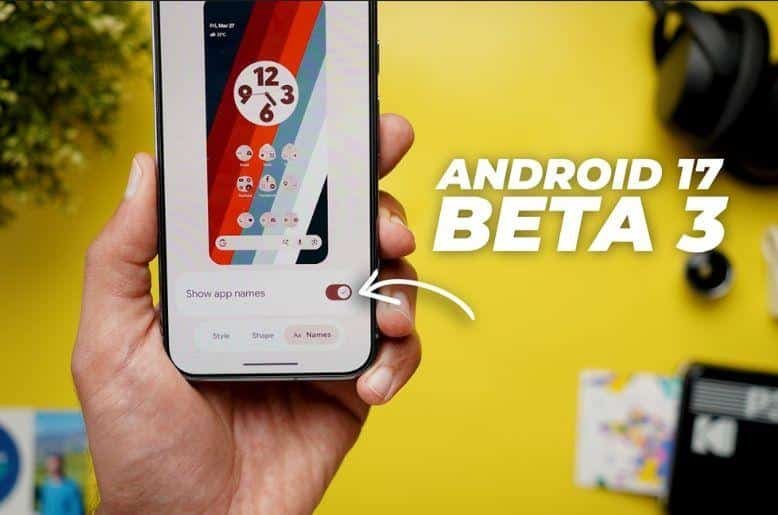
Google rolled out Android 17 beta 3 for Pixel devices today. This update arrives exactly one month after the second release. Tech fans and regular users want to know what makes this version special. We will look at all the new features and changes.
You will see big improvements in speed and design. This guide gives you a clear look at the fresh additions. We explain everything in simple words. You do not need to be a tech expert to understand these exciting updates.
Important release details for android 17 beta 3
Google follows a strict schedule for its software updates. The Android 17 beta 3 update comes out right on time. Developers and public testers can download it right now.
Google plans to release the final version later this year. The beta testing phase helps the company find bugs. They fix these problems before the final launch of the public.
You need a compatible device to use this software. Google supports many phones and tablets. You can install Android 17 beta 3 on the Pixel 6, Pixel 6 Pro, and Pixel 6a.
The update also works perfectly on the Pixel 7, Pixel 7 Pro, and Pixel 7a. Users with newer devices get the same access.
This includes Pixel 8, Pixel 8 Pro, and Pixel 8a. Google also includes the latest premium models. You can use the Pixel 9 series and the completely new Pixel 10 series.
The Pixel Fold and Pixel Tablet support the update too. Google wants everyone to test the system on different screen sizes.
Fresh design choices and visual changes
Your phone screen looks different from the Android 17 beta 3. Google engineers changed the way notifications appear. The notification panel now groups your messages better. You can read your alerts quickly. The quick settings menu features larger buttons. You can tap these buttons easily while you walk.
The lock screen gives you more choices. You can change the clock size and color. You can add small widgets to see the weather or your step count. Google added new animations across the whole system.
Apps open smoothly. The screens glide effortlessly when you swipe. These visual changes make your phone feel brand new. The dark mode also looks deeper. This helps protect your eyes at night.
Google introduced smart wallpapers in this release. Your wallpaper changes colors based on the time of day. The icons match the colors of your background perfectly. This creates a beautiful and clean look.
You can organize your home screen folders with new shapes. The system lets you adjust the text size easily. People with weak eyesight can read their messages without straining their eyes.
Big improvements to battery and speed
Nobody likes slow phones. Android 17 beta 3 makes your device run faster. Google changed how the software handles background apps. Your phone uses less memory now. This means your favorite games load in seconds. You can switch between different apps without any lag.
Battery life sees a major boost in this update. The software teaches your daily habits. It stops unused apps from draining your power. You can use your phone all day on a single charge.
We noticed the phone stays cool during heavy use. The new operating system manages heat much better. This extends the lifespan of your battery. You save money because you do not need a new battery soon.
Advanced privacy and security features
Your personal information needs strong protection. Android 17 beta 3 brings better security tools to your pocket. Apps must ask you before they access your photos or location.
You can give them permission just one time. The software automatically removes permissions from apps you do not use.
Google introduced a new secure folder space. You can lock your private banking apps in this space. You need your fingerprint to open it. The system also warns you about unsafe websites.
It blocks harmful links in your messages. You feel safe when you browse the internet. Parents get new tools to protect their children online. You can set strict limits on screen time and app downloads.
The privacy dashboard gives you a complete report. You can see exactly which apps looked at your camera over the last week. The microphone indicator shows a green dot when an app is listened to you.
You can turn off the camera and microphone completely with one button. This gives you total control over your privacy.
Artificial intelligence upgrades
Artificial intelligence makes daily tasks easier. Android 17 beta 3 uses smart technology in new ways. The keyboard suggests better words while you type. It fixes your grammar mistakes instantly. You can reply to emails faster with smart suggestions.
The camera app uses new artificial intelligence tricks. Your photos look bright and clear even in dark rooms. The software removes unwanted objects from your pictures with one tap. You do not need to download extra photo editing apps. The voice recorder types out your conversations accurately. Students and office workers will love this feature. You save hours of typing time.
The system translates languages instantly. You can watch English Videos with Urdu subtitles generated right on your screen. Artificial intelligence understands context better now. It blocks spam calls before your phone even rings. It tells you why a business is calling you.
App compatibility and tools for developers
Developers play a huge role in the Android world. Google gives them new tools in Android 17 beta 3. Programmers can build better apps with the latest software kits.
They test their apps to make sure everything works perfectly. You will not experience crashes when you open your favorite social media apps.
The new system supports advanced graphics for mobile games. Game creators can make worlds that look incredibly real. The software handles complex calculations quickly.
Developers also get better tools to make their apps accessible to everyone. They can add voice commands easily. This teamwork between Google and developers makes your app experience flawless.
Why this update matters for users in Pakistan
Mobile phone users in Pakistan needs reliable software. Many people use their phones for business and education. Android 17 beta 3 offers features that help local users. The better battery life helps during power outages. You stay connected with your family for a longer time.
The new security features protect users from mobile scams. You get warnings before you open dangerous links. The improved voice typing understands different regional accents better. You can send messages easily.
The software runs smoothly on older phones like the Pixel 6. You do not need to buy expensive new phones to enjoy these features.
Just like Google is pushing Android 17 forward with powerful new features, OpenAI is also making big moves in the AI world. Read our full coverage on how OpenAI closed its Sora video tool and ended its $1 billion Disney deal. This update brings premium quality to everyone.
How to get the update
You might want to test these features today. You must enroll your phone in the Android beta program first. Visit the official Google website to sign up. The process takes only a few minutes. Your phone will receive a notification after you register.
You go to your system settings to download the update. Tap on system updates and press downloads. You should connect your phone to a fast internet connection. The file size is large.
You must plug your phone into a charger during the installation. The phone restarts a few times. You will see the new Android 17 beta 3 welcome screen when it finishes.
Frequently asked questions
What is Android 17 beta 3?
It is the latest test version of the Android operating system. Google releases it to test new features before the final launch.
Which phones support this update?
You can install it on Google Pixel 6 and newer models. This includes the Pixel 7, Pixel 8, Pixel 9, and Pixel 10 series.
Is the beta software safe to use?
The software is mostly safe, but it might have small bugs. You should always back up your important files before you install them.
Does this update improve battery life?
Yes, the new system manages background apps better. Your battery will last much longer during daily use.
How much does the update cost?
The update is completely free for all compatible Pixel users. You just need an internet connection to download it.